
Portrait game: hold your phone upright or use Full screen.
Landscape game: turn your phone sideways; Full screen is roomier.
About Snoopspot
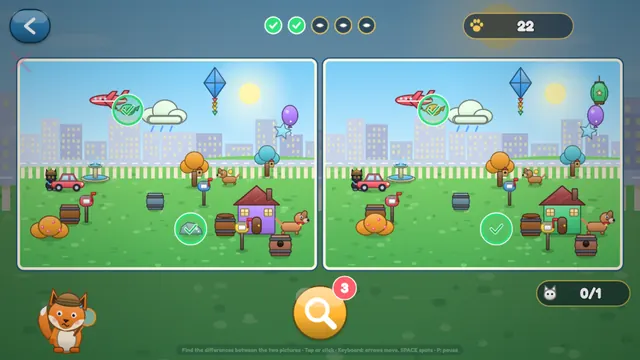
Snoopspot is a cheerful spot-the-difference puzzle where you join detective fox Pip to compare two illustrated pictures and spot what changed. Every scene hides 5 to 10 differences across 7 types: color, detail, missing, added, moved, scale, and flipped objects. Each difference is verified by the game itself through real pixel comparison, so every change is genuinely there. A wordless hand-and-ring tutorial gets you playing right away.
Play at your own pace in relaxed mode, or test your focus in timed mode where every missed tap takes 5 seconds off the clock. Spotting differences within a 7-second window builds a combo for bonus paws. Whenever you need a nudge, the magnifier hint recharges automatically every 90 seconds (up to 3 stored, ad-free). Each scene also hides a mischievous cat to fill your 256-cat album, and you can spend collected paws in the wardrobe to unlock 12 silly hats for Pip while collecting completed scenes in your polaroid album.
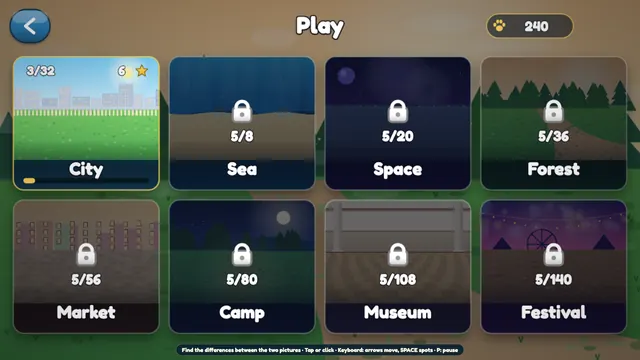
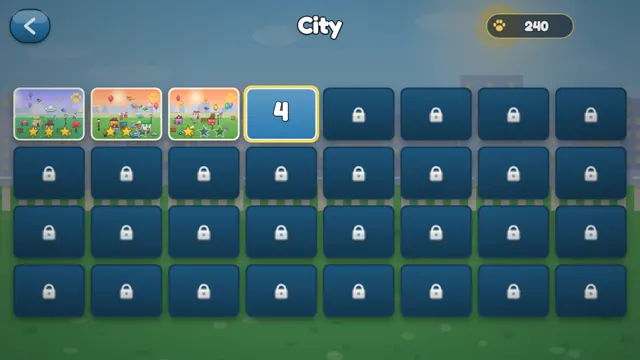
The game spans 256 scenes across 8 themed worlds (32 scenes per world): City, Underwater, Space Station, Forest Cabin, Market, Camp, Museum, and Festival. Each world features 3 weather and time variants, plus a brand-new daily scene with streak tracking every day. Your unlocked worlds, stars, paws, hats, and albums are saved right in this browser.
How to play Snoopspot
- Pick an unlocked world and scene from the main screen, or jump into the daily scene, and choose either relaxed mode or timed mode.
- Compare the two pictures carefully and tap or click directly on a difference. On a keyboard, move the cursor with the arrow keys or WASD and press Space or Enter to mark it.
- Watch for 7 types of changes—color, detail, missing, added, moved, size, and flipped items—and keep an eye out for the hidden cat tucked into every scene.
- Spot differences within 7 seconds of each other to build a combo for bonus paws. In timed mode, each miss subtracts 5 seconds from your timer, so aim carefully.
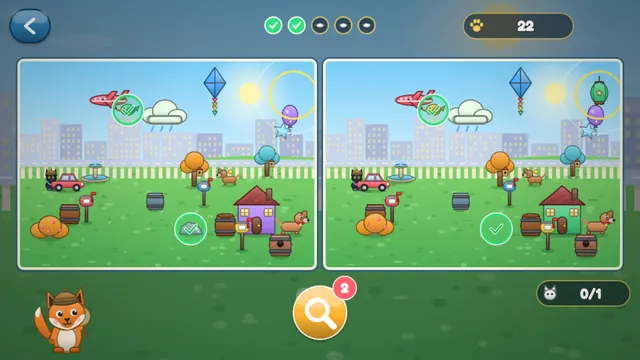
- Stuck on a tricky spot? Tap the magnifier hint to reveal a difference—hints recharge +1 every 90 seconds automatically (up to 3 stored, without ads).
- Finish a scene to earn stars, paws, and a polaroid album entry. Spend paws in Pip's wardrobe to unlock 12 silly hats, and press P anytime to pause.
Controls
Standard Gizo keys work in every game. Touch controls appear on phones and tablets.
Tips and tricks
- Scan the scene section by section—such as sky, background, then foreground—instead of jumping around randomly to catch subtle color and detail changes.
- When you spot two differences near each other, mark them within 7 seconds to trigger a combo and earn extra paws.
- Avoid blind guessing in timed mode: every wrong tap deducts 5 seconds from the clock and puts your 3-star rating at risk.
- Look for the hidden cat before marking the final difference, so you add each scene's unique cat to your 256-cat album.
- Your magnifier hint stops recharging once it hits 3/3, so don't hesitate to use one when a tough difference holds you up.
Features
- 256 scenes across 8 themed worlds (32 per world) with 3 weather/time variants, plus a brand-new daily scene with streak tracking.
- 5 to 10 differences per scene across 7 types (color, detail, missing, added, moved, scale, flipped), each pixel-verified by the game itself.
- A hidden cat in every scene with a 256-cat collection album, plus a polaroid scene album and up to 3 stars per scene.
- Relaxed mode for unhurried play or timed mode with a 5-second miss penalty, paired with 7-second combos and auto-recharging magnifier hints.
- Expressive detective fox Pip who reacts to your play and can be dressed in 12 silly hats bought with in-game paws.
- Kid mode on by default (zero ads) behind a parent gate, 25 languages including RTL, layered music, and seamless portrait and landscape play.
Look and feel
Snoopspot takes you through 8 lively worlds—City, Underwater, Space Station, Forest Cabin, Market, Camp, Museum, and Festival—each packed with themed props and 3 weather/time variants. Detective fox Pip reacts with charming idle, happy, celebrating, sad, hint-peeking, and sleepy animations, celebrating cleared scenes with confetti. World backdrops fill the screen edge-to-edge with no black bars in both portrait and landscape, accompanied by 31 sound effects with rising chime pitches on each find, 4-layer cheerful music with 8 world motifs, and world-specific ambient audio.
Who is it for?
Snoopspot is a friendly, family-oriented puzzle game designed for children and players of all ages, with a wordless tutorial that makes it easy to pick up. Kid mode is enabled by default and shows zero ads while active. If an adult passes the parent gate (by holding for 2.2 seconds) and switches kid mode off, there are still no ads during gameplay—only optional rewarded videos (+2 hints, +25 seconds, or 2x paws, with no penalty for declining) and rare interstitial ads between scenes starting from scene 4. There are no real-money purchases; all hats are unlocked using paws earned in-game.
Screenshots
Snoopspot FAQ
Is it free?
Yes, Snoopspot is completely free to play right in your browser with no account or download required. Kid mode is on by default and shows no ads; if turned off behind the parent gate, optional rewarded videos and rare ads between scenes are enabled. There are no real-money purchases.
How do kid mode and the parent gate work?
Kid mode is turned on by default and blocks all ad requests completely. Adults can turn it off by holding the parent gate for 2.2 seconds to allow optional rewarded videos and rare interstitials between scenes.
How many scenes and worlds are there?
There are 256 scenes spread across 8 worlds (32 each): City, Underwater, Space Station, Forest Cabin, Market, Camp, Museum, and Festival—plus a brand-new date-seeded daily scene every day.
What is the difference between relaxed mode and timed mode?
Relaxed mode has no countdown, letting you compare pictures at your own pace. Timed mode sets a timer based on the number of differences, and every wrong tap takes 5 seconds off the clock.
How do magnifier hints and hidden cats work?
The magnifier hint highlights a difference you haven't found yet and recharges +1 every 90 seconds (up to 3 stored, ad-free). Every scene also hides a unique cat that is collected into your 256-cat album once spotted.
How does it play on phones and computers?
Tap directly on touchscreens, click with a mouse, or use arrow keys/WASD and Space/Enter on a keyboard (press P to pause). It plays in portrait on phones and landscape on desktop with full-bleed backgrounds and no letterbox bars.
Is my progress saved and can I play offline?
Yes. Your unlocked worlds, stars, paws, Pip's hats, polaroid scene album, 256-cat album, and daily streak are saved in this browser, and the game also works offline once loaded.
Recently played
Your favorites
Games like Snoopspot




Snoopspot on your phone
Snoopspot is built for the browser. Your progress stays in this browser.