Portrait game: hold your phone upright or use Full screen.
Landscape game: turn your phone sideways; Full screen is roomier.
About Turbo Kivrim
Turbo Kivrim is a fast-paced pseudo-3D arcade drift racer with automatic throttle so you can focus entirely on racing lines and momentum. You start every race in last place behind 7 rivals. Slide through sharp bends to earn a drift boost, tuck behind opponents to catch their slipstream, and fire your nitro at the right moment to charge up the field.
Centrifugal force pushes your car toward the outside of every turn, and drifting off-road slows you down. Hitting rivals or roadside objects causes no vehicle damage, though it cuts your speed; from track 7 onward in Career and Elimination, knockable barrel stacks and soft barriers also appear on the road with warning cones, always leaving at least one open lane. Take on 6 named bosses at the end of Career cups, test yourself in Elimination, traffic-filled Sprint, Daily Challenge, and Ghost races, and customize 16 cars with 8 paints and five-level engine, tire, and nitro upgrades.
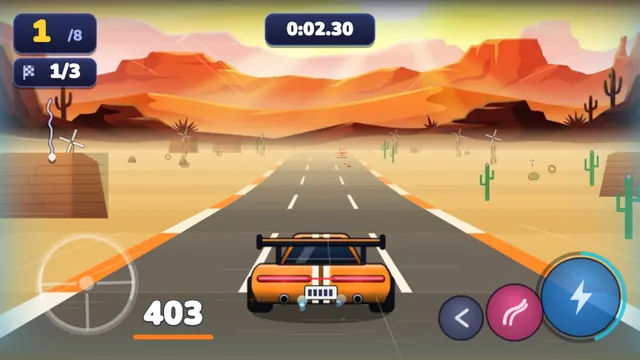
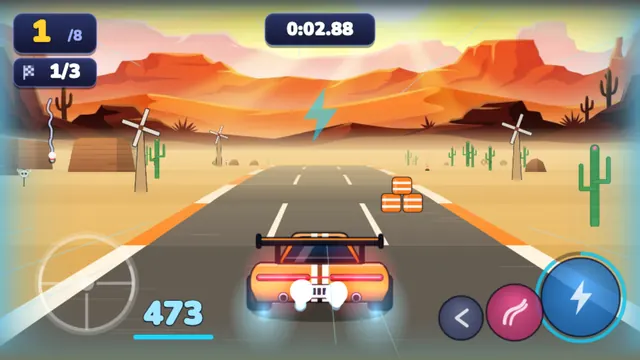
The game features 24 tracks spread across six worlds—Neon City, Desert, Snow, Forest, Night, and Coast—with four tracks per world. A pre-race screen lets you pick your mode and compare your ride against the recommended car. Playable in portrait on phones and landscape on desktop, Turbo Kivrim saves all your progress, upgrades, awards, and ghost runs directly in your browser.
How to play Turbo Kivrim
- Pick Career, Elimination, Sprint, Daily Challenge, or Ghost mode from the main menu, then check the pre-race screen to compare your car against the recommended tier and start.
- Time the launch for a rocket start. Throttle is automatic—steer with A/D or the Left/Right arrow keys, touch steering, or optional tilt controls.
- Press Enter or tap the drift button as you enter tight corners to slide through the apex and exit with a drift boost.
- Draft directly behind rival cars to build slipstream speed, then trigger nitro with Space or the on-screen nitro button on straightaways.
- Stay on the road to avoid off-road slowdown, tap S or Down to brake when needed, and weave into the open lane around warning-coned road obstacles from track 7 onward.
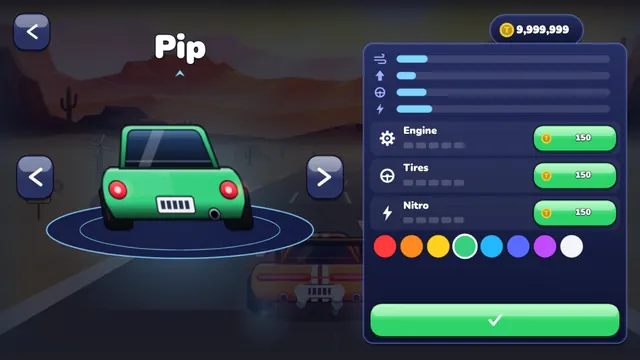
- Spend your race rewards and daily gifts in the garage to unlock new cars and upgrade engine, tires, and nitro. Press P anytime to pause.
Controls
Standard Gizo keys work in every game. Touch controls appear on phones and tablets.
Tips and tricks
- Starting from the back makes slipstreaming huge—stay tucked right behind rivals to pick off early positions without spending nitro.
- Hold the inside line when drifting so centrifugal force does not push you onto the slow off-road shoulder before your drift boost triggers.
- Save your nitro for corner exits and long straights instead of burning it mid-turn where you might drift wide.
- From track 7 onward, watch early for warning cones signaling road barrels and barriers; they deal no damage, but hitting them slows you down and one lane is always clear.
- If a cup boss or Sprint medal target feels tight, check the pre-race car comparison and invest in engine, tire, or nitro upgrades in the garage.
Features
- 24 hilly, curving tracks across 6 worlds: Neon City, Desert, Snow, Forest, Night, and Coast.
- 16 unlockable cars, 8 paint options, and 5 upgrade levels each for engine, tires, and nitro.
- Multiple modes: Career (6 cups and 6 named bosses), Elimination, Sprint with traffic, Daily Challenge with a 7-day streak, and Ghost races.
- Auto-throttle arcade physics with drift boost, slipstream, nitro, rocket starts, and damage-free road obstacles.
- Accessibility and global support: steering sensitivity slider (0.6–1.6), colorblind mode, text-free tutorial, and 25 languages.
- 12 achievements, daily gifts, and seamless portrait and landscape play.
Look and feel
Turbo Kivrim's pseudo-3D segmented road pairs each world with its own sky, horizon, distance fog, and roadside set pieces—from traffic lights and bus stops in Neon City to windmills and tumbleweeds in the Desert, snowmen and ice spikes in Snow, logs and wooden fences in the Forest, and surf racks and beach huts along the Coast. Persistent tire marks, camera roll, nitro FOV and speed lines, smoke and sparks, and slow-motion finishes keep every race kinetic, backed by 4 synthesized engine characters, 43 sound effects, and 4-layer music across 6 keys.
Who is it for?
Turbo Kivrim is designed for a general audience aged 13 and up. There are no ads during active racing; rewarded videos are strictly optional, and interstitial ads between races are very rare (with none during the first 5 minutes). There are no real-money purchases, no personal data is collected, and your progress is stored locally in your browser.
Screenshots

Turbo Kivrim FAQ
Is it free?
Yes, Turbo Kivrim is completely free to play right in your browser with no account or download required. There are no real-money purchases—only optional rewarded videos and very rare interstitial ads between races.
What game modes are included?
You can play Career across 6 cups with 6 named bosses, Elimination, Sprint with traffic and gold/silver/bronze targets, Daily Challenge with a 7-day streak, and Ghost races against your own best runs.
How is my progress saved?
Your unlocked cars, upgrades, paints, achievements, track records, and ghost replays are saved automatically in your current browser.
Can I play on a phone or tablet?
Yes. The game supports both portrait and landscape layouts and includes touch steering, on-screen buttons, and optional tilt controls.
Do crashes damage my car?
No. There is no damage system—bumping rivals, roadside props, or on-road barrels and soft barriers only slows you down temporarily.
What accessibility and language options are available?
You can adjust steering sensitivity from 0.6 to 1.6, enable colorblind mode, and switch between 25 supported languages in the settings menu.
Does it work offline?
Yes, once loaded it works offline and collects no personal data.
Recently played
Your favorites
Games like Turbo Kivrim





Turbo Kivrim on your phone
Turbo Kivrim is built for the browser. Your progress stays in this browser.