
Portrait game: hold your phone upright or use Full screen.
Landscape game: turn your phone sideways; Full screen is roomier.
About Orbit Orchard
Orbit Orchard is a puzzle game about launching a seed and letting planets bend its path. You pull back like on a slingshot and let go; the seed flies off, and every planet with a gravity ring around it tugs the seed toward itself. Your job is to curve the seed into the fruit tree. A dotted preview of the path shows what the seed will do before you release, so aiming is a matter of reading the pull instead of guessing.
Not every planet is friendly. Touching a planet destroys the seed, so you slip past its edge or loop around it. Spiky blooms push the seed away instead of pulling it in, jelly planets bounce it, orbiting planets start moving the moment you launch, and portals swallow the seed on one side and spit it out on the other. In later levels there are two or three trees, and they all have to be reached in the same flight. Three star seeds float in each level; collecting them is the way to the last star.
There are 60 levels in three worlds: Daylight Garden (1-20), Twilight (21-40) and Crystal Night (41-60). You get five seeds per level; if all five miss, you try again. Each cleared level pays Golden Seeds, which you spend in My Garden on new seeds, a longer orbit preview and garden decorations. Your progress is stored in this browser.
How to play Orbit Orchard
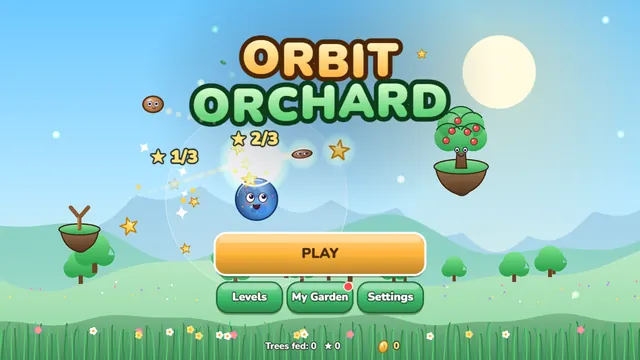
- On the title screen press Play; you continue from the level you last reached. The Levels button opens the map of the three worlds and lets you pick any unlocked level, and My Garden opens the shop.
- To aim, press anywhere on the playfield (not on a button), drag back from where you pressed and let go. The seed flies the opposite way from your drag, and the farther you drag the harder it is launched. While you drag, a dotted preview shows the path the seed will take.
- Read the gravity rings: a planet pulls the seed only inside its ring, and the pull is strongest close to the planet. A seed that is not aimed straight at the tree can curve around a planet and arrive from the side. Touch a planet itself and the seed is lost, so use the edge of the ring, not the surface.
- Pick up the star seeds on the way if you can: each of the three you collect lights a star in the corner. Reach every tree in a single flight to clear the level; with two or three trees, one seed has to touch them all.
- You have five seeds per level. When they run out the level ends and you can retry. The Restart button (or R pressed twice) restarts a level, and the arrow button at the top left goes back to the map.
- Stuck? The Hint button shows the solution path for a few seconds; depending on the ad setup it is offered as an optional video or given for free. After a win, spend your Golden Seeds in My Garden on the Cherry, Peach or Rocket seed, on a longer orbit preview or on decorations, and switch seeds with the seed button at the bottom left of the playfield.
Controls
Standard Gizo keys work in every game. Touch controls appear on phones and tablets.
Tips and tricks
- The first levels have a single planet: aim a little past it on the side of the tree and let gravity do the curving. Short messages in levels 1-3 introduce dragging, gravity and star seeds.
- Use the preview. The dotted line is computed with the same physics as the real flight, so what it shows is what the seed does, including how orbiting planets will move. A longer preview can be bought in My Garden in five steps.
- Repeat what works: after a shot the angle and power are kept for the next one, so you can nudge them a little instead of starting over.
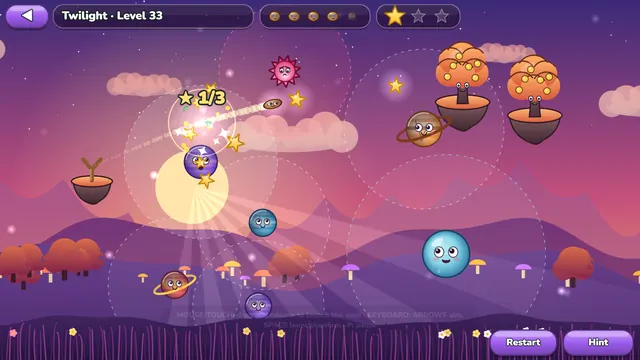
- Spiky blooms push the seed away: use one like a soft wall that turns the seed toward the tree. Jelly planets bounce the seed instead of destroying it, so a bounce can be part of the route.
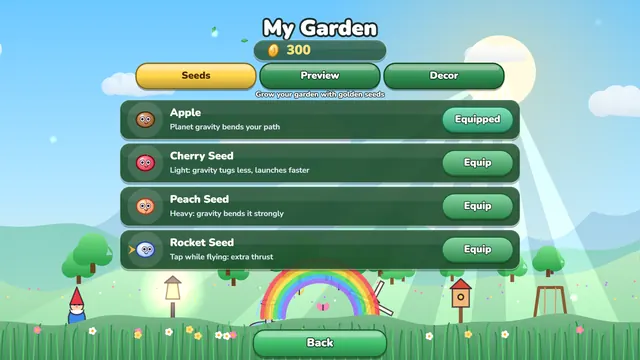
- Seeds change the flight: the Cherry seed is light and launches faster, the Peach seed is heavy and bends more in gravity, and the Rocket seed gives one extra push when you press in flight. None is needed to clear a level, since every level has a solution with the starting Apple seed.
Features
- 60 levels in 3 worlds: Daylight Garden (1-20), Twilight (21-40) and Crystal Night (41-60), each with its own sky, layered hills and music
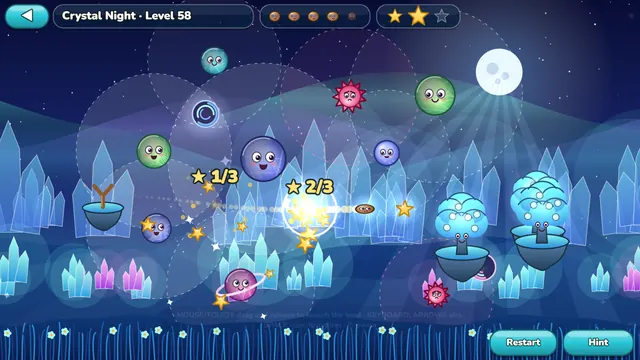
- Gravity puzzles with growing variety: planets with gravity rings, spiky blooms (from level 10), two trees (from 15), jelly planets (from 24), orbiting planets (from 26), portal pairs (from 45) and three trees (from 54)
- A dotted preview drawn with the same physics as the flight, plus a Hint button that shows the recorded solution path
- Every level is solvable: all 60 levels were solved by an automatic solver and replayed in the real simulation in the game's own test, with all three stars reachable; late levels leave little room for error, so expect to nudge the aim in small steps
- My Garden: 3 extra seeds, a 5-step longer orbit preview and 8 garden decorations, all bought with Golden Seeds earned in play; nothing costs real money
- Plays with a mouse, keyboard or touch; fits portrait and landscape phones, in English and Turkish
Look and feel
The Daylight Garden is a bright orchard of pale hills and drifting clouds. Twilight turns the sky violet and pink with a low glowing sun, and Crystal Night is a starry sky with soft colored light bands and glowing crystals. The hills shift in layers behind the playfield as you change the aim, planets get a happy face when the seed flies through their gravity ring, and trees give a little fruit pop when they are reached. Launches, the gravity hum, star seeds, bounces, portals, eating and winning each have their own sounds, and every world plays its own music. In Settings you can change effects quality, screen shake, music and sound separately.
Who is it for?
Orbit Orchard is made for players aged 13 and up. There is nothing to buy with real money: Golden Seeds are earned only by playing. No ads appear while you aim or fly. If ads are switched on, after a win an optional rewarded video may be offered to double the Golden Seeds you earned, and after you run out of seeds an optional video can give 2 extra seeds; they are only watched if you choose. In that case a short ad may appear when you go on to the next level.
Screenshots
Orbit Orchard FAQ
Is it free?
Yes, you play free on the portal with no account or download. The optional videos (double the Golden Seeds, 2 extra seeds, hint) are never required, and there is nothing to buy with real money.
How do I play?
Press and drag back like on a slingshot, then release: the seed flies the opposite way and planets bend its path. The goal is to reach the fruit tree, or all the trees in a level, in a single flight. If you touch a planet or fly off screen, that seed is lost; you have five seeds per level.
How do I earn stars?
Reaching the tree earns 1 star, doing it in at most two shots earns a second, and collecting all three star seeds in the level earns the third. With 60 levels you can collect at most 180 stars.
What do the different planets do?
Normal planets pull the seed toward them but destroy it on contact. Spiky blooms (from level 10) push the seed away. Jelly planets (from level 24) bounce it. Orbiting planets (from level 26) circle while the seed flies. Portals (from level 45) come in pairs: enter one and the seed leaves through the other.
What are Golden Seeds for?
Golden Seeds are the in-game currency you earn by clearing levels; more stars and more collected star seeds pay more. In My Garden you spend them on the Cherry, Peach and Rocket seeds, on a longer orbit preview (5 steps) and on 8 garden decorations. They cannot be bought with real money.
What does the Rocket seed do?
After you buy it in My Garden (Seeds tab) you can switch to it with the seed button at the bottom left of the playfield. It flies like a normal seed, and when you press, click, tap or hit Space or Enter in flight it gets one extra push, once per shot.
Is my progress saved?
Yes, your stars, Golden Seeds, seeds and decorations are saved in this browser. If you clear site data or switch to another browser or device you start again.
Recently played
Your favorites
Games like Orbit Orchard

Orbit Orchard on your phone
Orbit Orchard is built for the browser. Your progress stays in this browser.