
Portrait game: hold your phone upright or use Full screen.
Landscape game: turn your phone sideways; Full screen is roomier.
About Noodle Cart
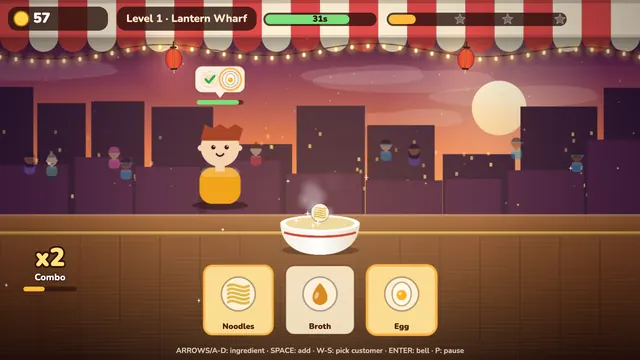
Noodle Cart is a fast, warm time-management game where you serve noodles from a street cart. Every customer arrives with an order bubble: a sequence of 2 to 6 ingredients. You add the ingredients to the bowl in that order, and the bowl is served the moment the sequence is complete. Serve before the customer's patience bar runs out and you earn tips and a combo; take too long and they walk away.
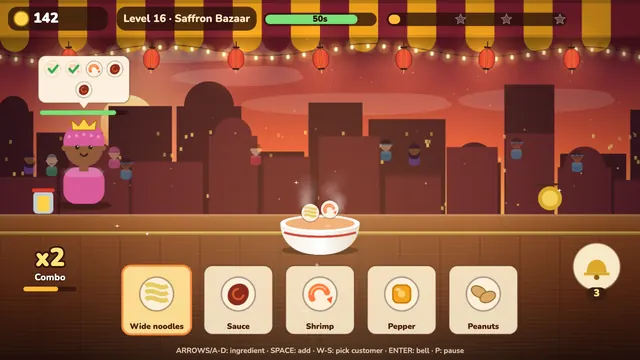
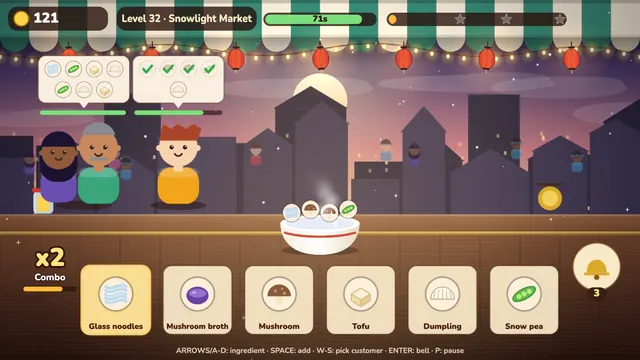
Three to six customers wait at the counter at once, and this is where the depth is: you decide who to serve first. Pick a customer with W and S (or by tapping). Some orders share a beginning; when two customers' sequences match the same prefix, the same ingredient advances both. Watch the patience levels: choosing who to rescue first is a small puzzle.
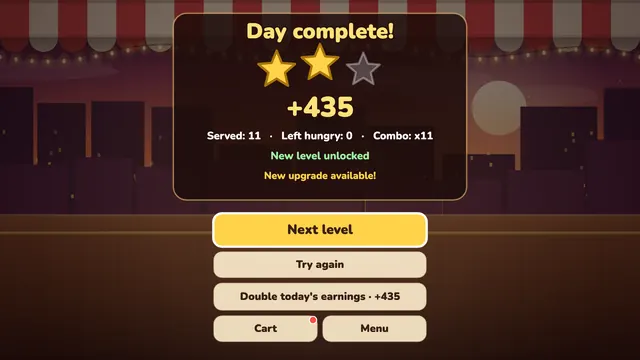
40 levels run across three cities: you start with classic broth at Lantern Wharf, the ingredients and light change at Saffron Bazaar, and orders and difficulty rise at Snowlight Market. Each city has its own ingredients, colors and light; a day lasts about 40-90 seconds. You spend your earnings on the cart: Cheery Lanterns make customers more patient, the Tip Jar raises earnings, an Extra Stool adds a customer seat, the Combo Gong lengthens the combo window and the Service Bell freezes patience for 5 seconds. Every upgrade shows on the cart.
How to play Noodle Cart
- Start a day. The customer's order bubble appears at the top: the ingredients to add in sequence. The ones you have added are ticked off.
- Pick and add an ingredient: on the keyboard choose with the arrows or A-D and add with SPACE; with the mouse or touch, click the ingredient directly.
- Finish the sequence correctly and the bowl is served right away. If you add an ingredient that is not next in the sequence it is rejected, your combo resets and you are briefly locked out, so add carefully. Serve before patience runs out: you earn tips based on the patience left.
- When several customers wait, pick who to serve with W and S (or by tapping a customer). Rescue the one whose patience will run out soonest first.
- Serving in a row builds a combo multiplier. Make the next serve before the combo window runs out.
- In a tight moment ring the Service Bell with ENTER (or the bell button): it freezes patience for 5 seconds. The number of bells is limited and grows with the upgrade.
- At the end of the day you get 1-3 stars based on earnings. Invest the money in the cart: Tip Jar, Extra Stool and more.
Controls
Standard Gizo keys work in every game. Touch controls appear on phones and tablets.
Tips and tricks
- Look at the customer with the least patience first: serve the one with the shortest bar. Finishing one sequence at a time beats leaving two half-done.
- Read orders from start to finish; you can advance two customers with a shared prefix together. Treat that as an opportunity, but do not forget the one with less patience.
- Save the Service Bell and use it when patience gets critical (when two or three customers go yellow at once).
- To keep the combo window alive, think ahead about the next ingredient; the Combo Gong makes this easier.
- Spend your first coins on Cheery Lanterns and the Extra Stool: more patient customers and more seats help most in the first cities.
- Ingredients differ in each city; do not trust muscle memory, take one look at the new set first.
Features
- Sequence-based orders: a 2-6 ingredient order sequence, 3-6 customers at once and shared prefixes
- 40 levels in 3 cities: Lantern Wharf, Saffron Bazaar and Snowlight Market, each with its own ingredients and palette
- Combos, tips and a service bell; a 3-star goal in every level
- 5 permanent cart upgrades: patience, tips, extra seat, combo window and service bell; all visible on the cart
- Keyboard, mouse and touch; landscape and portrait phone layouts; progress is saved in your browser
- A lively backdrop: stars, lanterns, city skylines, snow or sparks; sound and music are fully synthesized
Look and feel
Noodle Cart takes place in a warm night market drawn entirely in code: string lights under the awning, lanterns, a steaming bowl and three different city skylines behind. There is sea air at the Wharf, warm orange light at Saffron Bazaar and falling snow at Snowlight Market. Sound effects for adding, serving, the bell and a customer leaving are synthesized separately.
Who is it for?
A light time-management game for ages 13 and up: no violence, blood, gambling or random loot boxes. No ads appear while you play. If ads are shown they only appear at the end of a day (doubling earnings) or in the level info (+25% tips) and are optional; nothing depends on watching one.
Screenshots
Noodle Cart FAQ
Is it free?
Yes, you play free on the portal; no account or download needed. An optional rewarded ad (double earnings) may be offered at the end of a day, but nothing depends on it.
How long is a day?
Around 40 to 90 seconds depending on the level: shorter in the early levels, longer later.
What happens if I add a wrong ingredient?
An ingredient that is not next in the sequence is rejected, your combo resets and you are locked out for a moment; the bowl is not ruined. Read the order carefully; the ingredients you have added are ticked off in the bubble.
What does the Service Bell do?
It freezes every customer's patience for 5 seconds. You have a limited number of bells each day; the Service Bell upgrade increases the number.
Can I play on a phone?
Yes. There are separate landscape and portrait layouts; hold the phone however you like, the game does not reset when you rotate. Tapping the ingredients and customers is all you need.
Is my progress saved?
Yes, in this browser's local storage: levels, stars, your money and the cart upgrades. Clearing site data erases the save.
My computer is slow, what should I do?
The game lowers its quality automatically. You can also lower the display quality in the Esc menu; text always stays sharp.
Recently played
Your favorites
Games like Noodle Cart






Noodle Cart on your phone
Noodle Cart is built for the browser. Your progress stays in this browser.